
Start building with us today.
Buy this course — $199.00Linux Server Administration: Build a Secure Headless Home Lab
SysAdmin Mastery: Architectural Framework for Secure Home Laboratory Infrastructure
The landscape of professional system administration has undergone a profound transformation as of 2026. What was once the domain of hardware enthusiasts has evolved into a critical competency for software engineers, architects, and product managers. The modern home laboratory is no longer a collection of aging desktop towers but a sophisticated, distributed environment that mirrors the complexities of enterprise cloud infrastructure. This evolution is driven by the urgent need for digital sovereignty, the scarcity of hardware resulting from the global artificial intelligence expansion, and the sophisticated nature of modern security threats.1 A well-architected home lab serves as a high-fidelity staging ground for testing resilient designs, understanding kernel-level constraints, and mastering the tools that underpin global IT infrastructure.
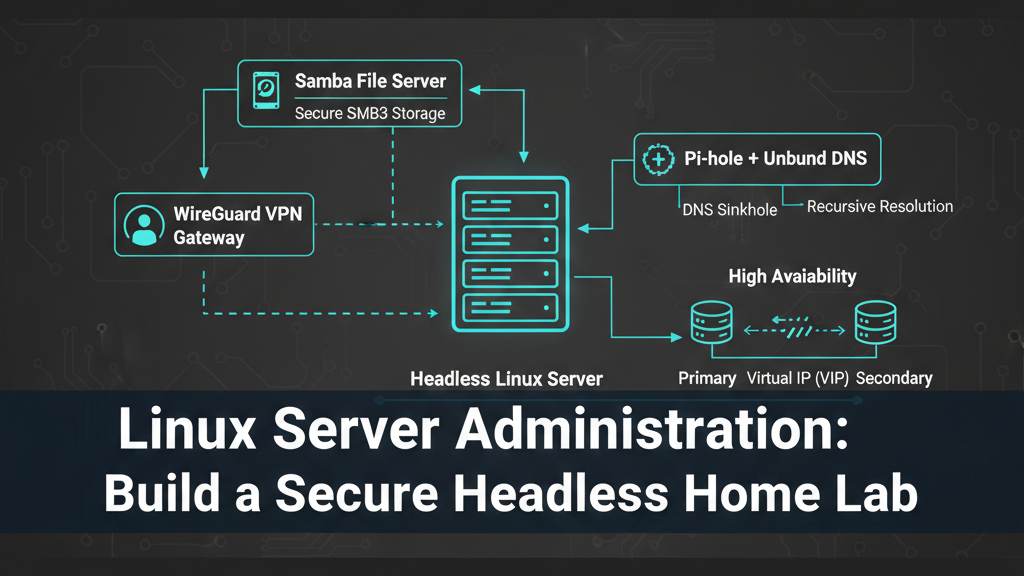
The core of this mastery lies in the deployment of a headless Linux server that functions as a secure gateway, a high-performance file sharing engine, and a privacy-focused DNS resolver. By configuring these services—WireGuard, Samba, and Pi-hole—through meticulous shell scripting and system hardening, professionals gain the nuanced insights required to design, develop, and manage robust technical ecosystems. The relevance of this endeavor extends beyond mere utility; it empowers the product manager to understand the trade-offs between latency and privacy, the architect to design for failure through high-availability protocols, and the developer to write code that respects the underlying system architecture.
Foundations of Modern System Administration: The Rationale for Mastery
The primary impetus for establishing a secure home lab in 2026 is the convergence of privacy concerns and professional development. As digital environments become increasingly invasive, the ability to self-host essential services provides a bastion for data integrity and familial privacy.2 From a career perspective, Linux has become the undeniable backbone of global IT infrastructure. Mastery of the headless environment—operating without a graphical user interface—is the hallmark of a senior engineer, requiring a deep understanding of shell scripting, network stacks, and service orchestration.2
Professional peers often find themselves at a crossroads when choosing between "cattle" and "pets"—the architectural philosophy of treating servers as disposable, automated units versus uniquely configured, irreplaceable machines. A modern laboratory environment encourages the "cattle" approach, utilizing configuration management and immutable patterns to ensure that any service can be rebuilt from code in minutes.4 This mindset is critical for DevOps and SRE professionals who must manage massive fleets of servers with zero manual intervention.
Furthermore, the 2026 hardware market reflects an "AI gold rush," where high-performance compute and ultra-low latency storage are at a premium.1 This scarcity forces a renewed focus on efficiency. Architects must learn to maximize the utility of existing hardware, leveraging technologies like ZFS special vdevs or PCIe bifurcation to extract enterprise-level performance from consumer or prosumer components.1 This course of study is not merely about installation; it is an investigation into the limits of modern computing.
Architectural Selection: Distributions and Hardware Paradigms
The selection of a Linux distribution represents the first major decision in the system lifecycle, dictating the support window, security model, and operational noise level. In 2026, the industry has standardized around a few key players. Ubuntu Server 24.04 LTS remains a dominant choice for developer-led teams due to its balance of modern tooling and a decade-long support window through standard and expanded maintenance.3 For those requiring binary compatibility with Red Hat Enterprise Linux (RHEL), AlmaLinux 9 and Rocky Linux 9 have emerged as the standard for long-lived production environments, offering enterprise-grade reliability and predictability through 2032.3
Experienced administrators often distinguish between the "just works" philosophy of Ubuntu/Debian and the conservative, security-first posture of the RHEL family. Debian 12 "Bookworm" remains the preferred choice for minimalist virtual private server (VPS) deployments where resource efficiency and a predictable update cycle are paramount.3 Meanwhile, specialized distros like Alpine Linux have gained traction for single-purpose nodes, utilizing musl libc and BusyBox to run comfortably in tens of megabytes of RAM—a critical advantage for containerized edge deployments.5
Strategic Distribution Comparison for 2026 Deployments
Hardware choices in the lab must mirror these OS capabilities. The prize for modern ZFS-based storage systems remains the Intel Optane drive, which despite its discontinuation, is highly sought after for its ultra-low latency and endurance in handling ZFS metadata and small file operations.1 Practitioners are also increasingly utilizing PCIe bifurcation to split single slots into multiple NVMe connections, allowing high-density storage configurations in small-form-factor builds.1 Understanding these hardware-level nuances allows the system engineer to diagnose bottlenecks that software-only analysis might miss.2
Secure VPN Gateway: The WireGuard Paradigm
The cornerstone of the secure laboratory is the VPN gateway. By 2026, WireGuard has effectively replaced legacy protocols like OpenVPN and IPsec due to its lean codebase of approximately 4,000 lines, compared to the hundreds of thousands of lines in competing solutions.6 This minimal complexity not only makes audits simpler but significantly reduces the attack surface. WireGuard is integrated directly into the Linux kernel (as of version 5.6+), which allows for maximum performance and efficient use of modern CPU features.7
Cryptographic Routing and Zero-Trust Principles
WireGuard operates on the principle of "cryptokey routing," which associates a peer's public key with a specific set of allowed IP addresses. This model ensures that the gateway only accepts traffic from authenticated peers, immediately dropping any packet that does not match a known key.6 This behavior provides an inherent layer of protection against automated scanners, as the server does not respond to unauthenticated requests.
Security in this layer is not a one-time configuration but an ongoing management of cryptographic material. Best practices for 2026 dictate that private keys should never leave the host they were generated on. Administrators utilize strict file permissions (![][image1]) to ensure that key material is readable only by the root user.9 The introduction of Pre-Shared Keys (PSKs) provides an additional layer of post-quantum resistance to the initial key exchange, which is critical as cryptographic standards continue to evolve.6
Performance Benchmarking and Optimization
Performance bottlenecks in VPN gateways are often the result of Maximum Transmission Unit (MTU) mismatches. When packets are larger than the available MTU, they undergo fragmentation, which significantly increases CPU overhead and decreases throughput.7 Professionals utilize the Path MTU Discovery (PMTUD) process to find the optimal size, typically starting with a baseline of 1472 bytes for the ICMP payload and subtracting the 60 bytes of IPv4/WireGuard overhead to arrive at a standard MTU of 1412 or 1420.7
For environments where ISPs employ Deep Packet Inspection (DPI) to throttle VPN traffic, the "stealth" profile becomes necessary. By shifting the WireGuard tunnel to UDP port 443, the traffic is often mistaken for routine HTTPS, allowing for full-speed streams and P2P transfers even under restrictive network filters.10
Hardened File Services: Samba and SMB3 Excellence
In a professional home lab, the file server is more than just storage; it is a critical component of the media and development pipeline. Samba has matured to fully support the SMB3 protocol family, which introduces mandatory encryption, signing, and performance-enhancing features like multichannel support and SMB over QUIC.11
SMB3 Security Hardening and Access Control
Hardening a Samba server in 2026 requires moving away from the "ease-of-use" defaults toward a strict security posture. The smb.conf configuration must explicitly mandate encryption and signing while disabling legacy protocols like SMB1 and SMB2.0.13 Setting server min protocol = SMB2_10 and ntlm auth = no effectively mitigates many of the legacy vulnerabilities that attackers still exploit.11
The authentication process itself has become more resilient with the introduction of the SMB authentication rate limiter. By enforcing a 2-second delay between failed NTLM or Kerberos attempts, the server renders brute-force attacks impractical—extending the time required for a 90,000-guess attack from minutes to over 50 hours.11 Furthermore, administrators utilize Access Control Lists (ACLs) to provide granular permissions at the filesystem level, ensuring that users can only access the shares they are explicitly permitted to see.13
Throughput Optimization for 10GbE Networks
For systems equipped with 10GbE network interfaces, the default Linux kernel settings become a bottleneck. To achieve the theoretical maximum of 1,250 MB/s, system architects must tune the network stack's memory limits.13
By increasing these receive and send buffer limits to 128 MB, the kernel can handle larger bursts of data without dropping packets.13 Within the Samba configuration, the use sendfile = yes parameter allows the system to copy data directly from the disk cache to the network card, bypassing unnecessary copies in memory. Asynchronous I/O (AIO) settings, such as aio read size = 16384, further optimize performance for large file transfers like high-definition video streams or large datasets.13
The introduction of SMB over QUIC represents a major shift in the "SMB VPN" concept. By utilizing UDP port 443 and TLS 1.3 certificates, Samba can provide secure, VPN-less access to remote users over untrusted networks. This advancement is particularly critical for mobile devices and remote engineers who need seamless access to file servers without the overhead of re-establishing VPN tunnels during IP changes.12
DNS Sovereignty: Pi-hole and the Recursive Resolver
The DNS layer is perhaps the most sensitive part of the laboratory infrastructure. It is where privacy is either protected or compromised. Pi-hole serves as a network-wide ad-blocker and DNS sinkhole, but its true power is realized when it is combined with a local recursive resolver like Unbound.16
The Recursive Resolution Journey
Standard DNS configurations forward requests to a third-party upstream provider (e.g., Google or Cloudflare). This creates a single point of data collection where the provider can profile the user's internet habits.17 By running Unbound in recursive mode, the home laboratory handles its own resolution. Unbound starts at the root of the DNS tree—the root servers—and walks the tree until it finds the authoritative nameserver for a given domain.16
This process introduces a performance trade-off. The first time a domain is queried, the resolution can take between 200ms and 800ms as Unbound performs the recursive walk.17 However, subsequent queries are served from the local cache in less than 1ms, which is significantly faster than any external resolver.18 To optimize this experience, administrators use prefetch: yes to refresh expiring cache entries and serve-expired: yes to provide immediate (though potentially stale) responses while the resolver fetches fresh data in the background.18
High Availability and DNS Resilience
In a professional environment, a DNS failure is a catastrophic event that halts all network activity. To achieve "production-grade" reliability, administrators deploy multiple Pi-hole instances in a High Availability (HA) cluster using Keepalived and the Virtual Router Redundancy Protocol (VRRP).20
Keepalived manages a Virtual IP (VIP) that floats between the primary and backup nodes. If the primary node's DNS service—monitored by a custom health-check script—fails to respond, the VIP automatically moves to the backup node within seconds.20 This failover is seamless to the client devices, which only see the single VIP as their DNS server. Synchronization tools like Nebula-sync or Orbital-sync ensure that blocklists and local DNS records are consistent across all nodes in the cluster, preventing configuration drift.21
Kernel-Level Observability: eBPF and XDP
For the systems engineer, the 2026 home lab is not just a place to run services but a place to observe them. eBPF (extended Berkeley Packet Filter) allows for the execution of sandboxed programs in the Linux kernel without modifying the kernel source or rebooting.24 This provides a level of granularity in monitoring that was previously impossible.
Tracing System Behavior
Using tools like bpftrace, an engineer can attach probes to kernel functions to monitor system behavior in real-time. This is invaluable for troubleshooting performance bottlenecks in the VPN or file server. For example, a simple script can count the number of system calls by process, revealing which service is consuming the most resources under load.26 Professionals also use eBPF for network observability, tying workload activity to network activity and identifying "DNS hotspots" or unauthorized connections between containers.27
High-Performance Packet Filtering with XDP
The eXpress Data Path (XDP) is a specific type of eBPF hook that runs directly in the network driver. This allows for extremely high-performance packet processing, making it possible to build firewalls and load balancers that process millions of packets per second with minimal CPU overhead.28 An XDP-based firewall can use a Longest Prefix Match (LPM) Trie map to drop blacklisted IP ranges before they even reach the main networking stack, protecting the laboratory from DDoS attacks and automated scanners.30
Security Hardening and Compliance Automation
The final stage of laboratory mastery is the implementation of enterprise security standards. In 2026, manual hardening is considered a relic of the past. Professionals utilize "Policy-as-Code" to enforce the Center for Internet Security (CIS) Benchmarks across their infrastructure.31
CIS Benchmarks and Level 1 vs. Level 2
CIS Benchmarks provide a standardized set of security recommendations covering everything from file permissions to kernel parameters. Level 1 hardening is designed to be low-friction and broadly applicable, while Level 2 hardening is more stringent and may introduce operational trade-offs for mission-critical systems.33 For a home lab, reaching a 90% compliance score on the Level 1 benchmark is a significant milestone that proactively hardens the production environment against the majority of common threats.34
Hardening Automation with Ansible
Ansible has become the tool of choice for automating these security controls. By utilizing community-maintained roles like devsec.hardening, an engineer can apply CIS-aligned hardening to hundreds of servers with a single command.32 This includes essential tasks like disabling unused filesystems, enforcing strong password policies, and hardening the SSH configuration to prevent unauthorized access.32
Maintaining this security posture requires continuous monitoring. Professionals use tools like OpenSCAP or Lynis to perform regular audits and ensure that "temporary" configurations do not become permanent vulnerabilities.32 In 2026, the mantra of the systems engineer is that a system is only as secure as its last automated audit.
Course Structure: The 90-Lesson SysAdmin Mastery Curriculum
The transition from a novice to an expert administrator is a journey of incremental mastery. This curriculum is structured into six phases, each building upon the concepts of the previous one to provide a comprehensive understanding of the secure headless Linux server.
Phase 1: Foundations and Distribution Selection (Lessons 1-15)
The initial phase focuses on the fundamental architectural choices that define the laboratory's future. It covers hardware identification, the philosophy of "cattle vs. pets," and the detailed comparison of modern Linux distributions.
Analyzing the Architecture of 2026 Home Labs
Hardware Selection: Maximizing the AI Gold Rush Surplus
The Philosophy of Digital Sovereignty and Self-Hosting
Linux Distribution Deep Dive: Ubuntu 24.04 LTS vs. AlmaLinux 9
Minimalism for Performance: Alpine and Tiny Core Linux
The Headless Mindset: Operating Without a GUI
Installation Strategies: Automated via Cloud-init vs. Manual
Shell Scripting Fundamentals: The Admin's Toolbox
Kernel 6.x and Beyond: Modern Linux Features for SysAdmins
Hardware Troubleshooting: Identifying Baseline Behaviors
ZFS and Modern Filesystems: The Data Backbone
Network Topology: VLANs, Subnets, and Isolation
Designing for Failure: The Resilience Mindset
The CLI Paradigm: Mastering the Bash Environment
Initial System Setup: Hardening the Baseline Install
Phase 2: The VPN Gateway and Remote Access (Lessons 16-30)
Phase 2 investigates the mechanics of secure tunnels. It focuses on WireGuard implementation, cryptographic routing, and bypassing network restrictions.
Introduction to WireGuard: Why It Replaced OpenVPN
The Noise Protocol: Understanding WireGuard Cryptography
Generating Keys with Strict Permissions (umask 077)
Configuring the Server Interface (wg0.conf)
Peer Management and Cryptokey Routing
Pre-Shared Keys (PSKs) for Post-Quantum Resistance
Advanced IP Forwarding and NAT Configuration
Solving the MTU Puzzle: Preventing Packet Fragmentation
PersistentKeepalive for NAT Traversal
Stealth VPN: Shifting to Port 443 for DPI Bypass
Multi-Peer Management Shell Scripting
Mobile Client Configuration: iOS and Android Setup
WireGuard Performance Benchmarking with iperf3
Hardening the Gateway Host: Firewall and SSH
Troubleshooting Handshake and Routing Issues
Phase 3: Secure File Sharing with Samba SMB3 (Lessons 31-45)
This phase covers the deployment of a high-performance file server, focusing on protocol hardening, throughput optimization, and modern QUIC transport.
The Evolution of SMB: From Vulnerable to Secure (SMB3.1.1)
Hardening smb.conf: Disabling Legacy Protocols
Mandatory Signing and Encryption: Ensuring Data Integrity
Access Control Lists (ACLs) and Granular Permissions
The SMB Authentication Rate Limiter: Mitigating Brute Force
Linux Group Management for Samba Users
Tuning the Kernel for 10GbE Throughput
Optimizing Samba: Sendfile, AIO, and Socket Options
SMB3 Multichannel: Utilizing Multiple NICs and Cores
Monitoring Active Sessions with smbstatus
SMB over QUIC: The "VPN-less" Future
Configuring TLS 1.3 Certificates for Samba
Troubleshooting Latency and Throughput Bottlenecks
Auditing Samba: Connection Logs and Compliance
Large-Scale File Transfers: Benchmarking Media Streaming
Phase 4: DNS Sovereignty and Pi-hole Mastery (Lessons 46-60)
Phase 4 focuses on the privacy and security of the DNS layer. It covers sinkhole deployment, recursive resolution, and high availability.
The Privacy Risks of Third-Party DNS Resolvers
Pi-hole v6: The Modern Sinkhole Architecture
Network-Wide Ad Blocking Without Client Software
Customizing Blocklists: StevenBlack and Beyond
Advanced Gravity Management: Managing Lists and Whitelists
Local DNS Records: Mastering the custom.list
The FTL Engine: High-Performance Query Logging
Recursive DNS with Unbound: Cutting Out the Middleman
Walking the Tree: The Mechanics of Recursion
Configuring DNSSEC for Authenticated Responses
Optimizing Unbound: Prefetch and Serve-Expired
High Availability DNS: Keepalived and VRRP Concepts
Configuring the Virtual IP (VIP) for Seamless Failover
Syncing Configurations: Nebula-sync and Orbital-sync
Troubleshooting "Resolution Very Slow" Pitfalls
Phase 5: Kernel Observability and Advanced Performance (Lessons 61-75)
This phase introduces the cutting-edge tools used by system engineers to monitor and optimize infrastructure at the kernel level.
Introduction to eBPF: The Linux Kernel's New Layer
How eBPF Programs Safely Execute in the Kernel
Tracing System Calls with bpftrace
Monitoring Network Latency with eBPF Probes
Identifying "DNS Hotspots" with bpftrace Scripts
Introduction to XDP: The Express Data Path
Building an XDP-based Packet Filter
High-Performance Rate Limiting with XDP
Observability Benchmarks for AI Training Clusters
Analyzing CPU Scaling and Thread Pinning
Investigating TCP Retransmits and Packet Loss
eBPF for Security: Detecting Unauthorized modifications
Performance Profiling with perf and FlameGraphs
Tracing the Lifecycle of a Packet: From NIC to App
Visualizing System Metrics with Grafana and Prometheus
Phase 6: Compliance, Hardening, and Production Readiness (Lessons 76-90)
The final phase focuses on the long-term management of the laboratory, ensuring security compliance and operational excellence.
The Center for Internet Security (CIS) Benchmarks
Level 1 vs. Level 2 Hardening: Making Strategic Decisions
Policy-as-Code: Automating Hardening with Ansible
Applying the Ubuntu Security Guide (USG)
Auditing for Configuration Drift
Standardizing Naming Conventions and Documentation
Automated Vulnerability Scanning with Lynis and OpenSCAP
Zero-Downtime Patching Strategies
Log Rotation and Centralized Logging (ELK/Graylog)
Backup and Restore: Preserving the Laboratory's State
Designing for "Cattle": Rebuilding from Shell Scripts
The Final Hardening Audit: Reaching 90%+ Compliance
Production Migration: Moving from Lab to Permanent Use
Continuous Improvement: Staying Updated in 2026
Capstone: The Automated Secure Laboratory Deployment
Pedagogy and Mastery: The Practical Takeaway
The culmination of this study is not merely a functioning server but the development of a professional instinct. By the end of the 90th lesson, the practitioner possesses the ability to construct a secure environment that is both high-performing and audit-ready. The practical takeaway is the repository of shell scripts and Ansible playbooks generated throughout the lessons, which allow for the deployment of a production-ready infrastructure in minutes.
The true value of this mastery is seen in the professional's ability to navigate real-world trade-offs. The product manager can now articulate why a security control might impact user latency; the software architect can design systems that are inherently resilient to network fluctuations; and the engineer can write code that is optimized for the underlying Linux architecture. In the complex IT landscape of 2026, where security and performance are paramount, the mastery of the secure home lab is the definitive path toward professional excellence in system administration.
GitHub Repository
Explore the complete codebase and implementation:
View on GitHub