Flutter App Development: High-Fidelity Travel App Engineering
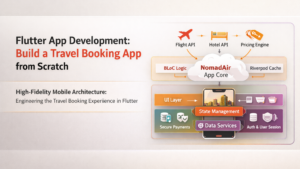
This course includes
- 90 lessons across 10 modules
- Hands-on coding exercises
- Downloadable resources & code
- Full GitHub repository access
- Certificate of completion
- 12 months of access
NomadAir Masterclass: High-Fidelity Travel App Engineering in Flutter
A Complete 90-Lesson Curriculum — Windows / Android Studio / Android Device
Platform Note: This entire course is built, tested, and verified on Windows using Android Studio. Every lesson concludes with a testable outcome on a physical Android device or Android Emulator (AVD). All tooling, paths, Gradle configurations, and debugging workflows are Windows-specific unless explicitly stated otherwise.
Course Overview
NomadAir is a production-grade flight and hotel booking application used as the single continuous project across all 90 lessons. The course is divided into three parts, each building on the previous. Every lesson is self-contained with a defined learning goal, implementation task, and a verification step on Android.
Mastery Challenge Format
Each of the 10 modules ends with a Mastery Challenge. These are structured as follows:
Task: A clearly scoped feature to add to NomadAir
Constraints: Must use only patterns taught in the module
Verification: Must run and pass on Android device or AVD
Rubric: Self-assessed against a provided checklist (correctness, architecture, performance, accessibility)
Peer Review Option: Share a screen recording + GitHub link for community feedback
PART 1 — BEGINNER
Building the Foundation of NomadAir
Goal: Set up the full development environment on Windows, scaffold NomadAir, build core screens, implement basic navigation, connect to a mock API, and write first tests — all verified on Android.
Module 1: Environment, Project Bootstrap & Android Workflow (Lessons 1–9)
This module ensures every student starts from an identical, verified Windows environment and understands how to build, run, and inspect a Flutter app on Android before writing a single line of product code.
Lesson 1 — Windows Environment Setup
Goal: Install and verify the full Flutter toolchain on Windows.
Install Git for Windows, Android Studio (latest stable), and Flutter SDK
Set
FLUTTER_HOME,ANDROID_HOME, andPATHenvironment variables via System PropertiesRun
flutter doctorand resolve all checkmarksCreate a first dummy app and confirm it launches on AVD
Android Verification: App runs on Android Emulator (Pixel 7 API 34) without errors.
Lesson 2 — Android Studio Configuration for Flutter
Goal: Configure Android Studio as the primary IDE for this course.
Install Flutter and Dart plugins
Configure AVD Manager: create a Pixel 7 Pro (API 34) and a mid-range device (Pixel 4a API 30) for performance testing
Set up ADB on Windows and verify physical device USB debugging
Explore the Flutter Inspector, Widget Tree, and Performance Overlay panels
Android Verification: Hot reload works on both emulator and physical device.
Lesson 3 — NomadAir Project Scaffold
Goal: Create the NomadAir monorepo structure from scratch.
Initialize the Flutter project:
flutter create nomadairSet up a multi-package structure:
packages/core,packages/ui,packages/dataConfigure
pubspec.yamlfor path-based dependenciesEstablish the folder structure:
lib/features,lib/shared,lib/coreAdd
.gitignore,README.md, and commit to a local Git repo
Android Verification: Scaffold compiles and launches on AVD showing a blank NomadAir splash.
Lesson 4 — Design Tokens and the NomadAir Theme
Goal: Define the visual language of NomadAir as a typed Dart system.
Create
AppColors,AppTypography, andAppSpacingtoken classesBuild a
NomadAirThemeusingThemeDatawith custom color schemesImplement light and dark theme variants
Apply the theme globally and verify contrast ratios meet WCAG 2.1 AA
Android Verification: Theme switches correctly between light and dark mode on device.
Lesson 5 — Beyond Material: Custom Design System Foundations
Goal: Break free from default Material widgets and begin building NomadAir's proprietary component library.
Understand why generic Material defaults hurt brand identity
Build
NomadButton,NomadCard, andNomadTextFieldas wrapper componentsEnforce design token usage across all custom widgets
Document each component with dartdoc comments
Android Verification: A components showcase screen renders all custom widgets on AVD.
Lesson 6 — Adaptive Layouts: Mobile, Tablet, and Foldables
Goal: Write one responsive codebase that adapts to screen size and form factor.
Use
LayoutBuilderandMediaQueryfor breakpoint-aware layoutsCreate
AdaptiveScaffoldthat switches between bottom nav (mobile) and side rail (tablet)Test on a foldable emulator (Pixel Fold AVD)
Handle both portrait and landscape orientations
Android Verification: NomadAir home screen adapts correctly on Pixel 7 and Pixel Fold AVDs.
Lesson 7 — Dark Mode as a First-Class Citizen
Goal: Implement dark mode that preserves brand integrity, not just inverted colors.
Map each design token to both light and dark variants explicitly
Handle image tinting and icon color switching
Persist user theme preference using
shared_preferencesTest contrast ratios on both themes with the Accessibility Scanner app on Android
Android Verification: Theme persists across app restarts on physical device.
Lesson 8 — Inclusive Design and WCAG 2.1 Foundations
Goal: Establish accessibility as an architectural concern, not an afterthought.
Understand the 66% neurodivergent traveler reality and its UX implications
Add
Semanticswrappers to all custom componentsConfigure minimum touch target sizes (48x48dp) across all interactive widgets
Enable TalkBack on Android device and navigate the app by voice
Android Verification: TalkBack reads all interactive elements correctly on physical Android device.
Lesson 9 — Mastery Challenge: The NomadAir Shell
Challenge: Deliver a fully themed, responsive NomadAir app shell.
Home screen with bottom navigation (3 tabs: Discover, Search, Trips)
Custom component library with Button, Card, TextField
Light/Dark theme toggle that persists
TalkBack-navigable on Android
Rubric: Theme consistency, token usage, accessibility, responsiveness
Module 2: Core Screens, Navigation, and Basic State (Lessons 10–18)
We build NomadAir's primary screens and implement clean navigation with basic state management.
Lesson 10 — Screen Architecture and the Feature Folder Pattern
Goal: Organize screens and logic using a scalable feature-first folder structure.
Each feature:
search/,discovery/,booking/,profile/Each feature folder contains:
screens/,widgets/,state/,models/Establish barrel exports (
index.dart) for clean importsUnderstand the difference between page, screen, and widget
Android Verification: All feature folders compile; navigation between placeholder screens works on AVD.
Lesson 11 — GoRouter: Declarative Navigation
Goal: Implement type-safe, deep-link-ready navigation across NomadAir.
Add
go_routerand define all named routesImplement nested navigation for the bottom nav tabs
Pass typed parameters between routes
Handle unknown routes with a 404 screen
Android Verification: Full navigation flow works on Android without route errors.
Lesson 12 — Deep Linking on Android
Goal: Enable NomadAir to open to a specific screen from a URL or notification.
Configure
AndroidManifest.xmlintent filters for deep linksTest
nomadair://flights/searchandnomadair://booking/{id}deep links via ADBHandle cold start vs warm start deep link scenarios
Validate with
adb shell am start -W -a android.intent.action.VIEW -d "nomadair://flights/search"
Android Verification: ADB deep link command opens the correct screen on physical device.
Lesson 13 — The Discovery Feed Screen
Goal: Build the video-first vertical discovery feed (inspired by TikTok-style travel content).
Use
PageView.builderfor vertical snapping cardsBuild
DiscoveryCardwith destination image, overlay metadata, and a "Book Now" CTAImplement lazy loading with
ListView.builderand virtualizationAdd skeleton loading shimmer while data loads
Android Verification: Feed scrolls smoothly at 60fps on mid-range AVD (Pixel 4a).
Lesson 14 — The Flight Search Screen
Goal: Build the primary flight search form with all travel-specific inputs.
Origin/destination city picker with autocomplete
Date range picker (departure + return)
Passenger count selector (adults, children, infants)
Cabin class selector
Form validation with clear error states
Android Verification: Form submits and navigates to results screen on AVD.
Lesson 15 — setState and Basic State Foundations
Goal: Understand when setState is appropriate and where its limits are.
Use
setStatefor purely local, ephemeral UI state (e.g., toggling a checkbox)Identify the "prop drilling" problem and why it breaks as the app grows
Refactor the passenger count selector to use a
StatefulWidgetcleanlyUnderstand widget rebuild scope and how to minimize it
Android Verification: Passenger counter increments/decrements without full page rebuild (verified via Flutter Inspector).
Lesson 16 — Introduction to Provider and InheritedWidget
Goal: Lift state above the widget tree using Provider as a stepping stone.
Add
providerpackage and create aSearchCriteriaProviderShare search state (origin, destination, dates) across Search and Results screens
Understand
ChangeNotifierandConsumerwidgetsIdentify Provider's limitations that motivate Riverpod
Android Verification: Search criteria persist when navigating between tabs on device.
Lesson 17 — Mock API Layer and Fake Data
Goal: Build a fully functional mock data layer so development is not blocked by a real backend.
Create
MockFlightRepositoryandMockHotelRepositoryReturn typed
Futureresponses with realistic delays (300–800ms)Add a
MockConfigtoggle to switch between mock and real dataUse
json_serializablefor typed JSON models
Android Verification: Search results screen populates with mock flight data on AVD.
Lesson 18 — Mastery Challenge: The Search Flow
Challenge: Complete end-to-end search flow from form to results list.
Search form → Results screen showing 10 mock flights
Each flight card shows: airline, route, duration, price, stops
State shared cleanly between screens
Deep link
nomadair://search?from=BOM&to=DXBopens pre-filled searchRubric: Navigation correctness, state sharing, mock data structure, deep link handling
Module 3: Data Modeling, Persistence, and Connectivity Basics (Lessons 19–27)
We introduce robust data modeling and basic persistence so NomadAir can survive app restarts and poor network conditions.
Lesson 19 — Data Modeling with Freezed
Goal: Build immutable, type-safe data models using Freezed.
Add
freezedandfreezed_annotationpackagesModel
Flight,Hotel,Itinerary,Passenger,PriceBreakdownUse
copyWith,when, andmapmethodsRun
build_runnerin Android Studio terminal on Windows
Android Verification: Models serialize and deserialize correctly (verified via unit test run in Android Studio).
Lesson 20 — Local Persistence with SharedPreferences and Hive
Goal: Persist simple and structured data locally on the Android device.
Use
shared_preferencesfor primitive settings (theme, currency, locale)Use
Hivefor structured data (recent searches, saved itineraries)Understand Android storage paths and permissions
Implement a
LocalStorageServiceabstraction
Android Verification: Recent searches persist across app restarts on physical device.
Lesson 21 — SQLite with Drift
Goal: Use a typed SQL layer for complex local data (itineraries, price history).
Add
driftpackage and defineFlightsTable,ItinerariesTableWrite typed queries: insert, select, update, delete
Run migrations for schema changes
Verify database file location on Android using Device File Explorer in Android Studio
Android Verification: Saved itinerary survives app kill and relaunch on physical device.
Lesson 22 — Networking with Dio
Goal: Build a robust HTTP client with interceptors, retry logic, and error handling.
Add
dioand create aNomadAirApiClientAdd interceptors: auth token injection, request logging, error normalization
Handle
DioExceptiontypes: timeout, connection error, server errorToggle between mock and live base URLs via
MockConfig
Android Verification: Network calls visible in Android Studio's Network Inspector (Profiler).
Lesson 23 — Connectivity Awareness
Goal: Detect network state and adapt the UI accordingly.
Add
connectivity_pluspackageBuild a
ConnectivityBannerthat appears when offlineQueue failed requests for retry when connection restores
Test airplane mode scenarios on physical Android device
Android Verification: Banner appears and disappears correctly when toggling airplane mode on device.
Lesson 24 — Error Handling Architecture with Result Types
Goal: Replace try/catch spaghetti with a functional Result<T, E> pattern.
Implement
Success<T>andFailure<E>sealed classesWrap all repository methods in
ResulttypesBuild a
NomadErrorWidgetthat renders contextual error messagesNever let raw exceptions reach the UI layer
Android Verification: Simulated API failure shows correct error UI (not a crash) on AVD.
Lesson 25 — Secure Storage for PII
Goal: Protect personally identifiable information on-device.
Add
flutter_secure_storage(uses Android Keystore)Store: authentication tokens, passport details, payment method tokens
Understand Android Keystore vs SharedPreferences security differences
Clear secure storage on logout
Android Verification: Token stored in Keystore confirmed via Android Studio Device File Explorer (encrypted, not plain text).
Lesson 26 — Push Notifications with Firebase Cloud Messaging
Goal: Implement fare alerts, booking confirmations, and flight status push notifications.
Set up Firebase project and add
google-services.jsontoandroid/app/Add
firebase_messagingpackageHandle foreground, background, and terminated state notifications
Implement notification payload routing (tap notification → open correct screen via deep link)
Request notification permissions on Android 13+
Android Verification: Test notification sent from Firebase Console opens the correct screen on physical device.
Lesson 27 — Biometric Authentication
Goal: Add fingerprint/face unlock to the NomadAir login and payment confirmation flow.
Add
local_authpackageCheck biometric availability on device
Trigger biometric prompt before showing saved payment methods
Handle fallback to PIN/password
Android Verification: Biometric prompt appears and authenticates on physical Android device with fingerprint sensor.
Lesson 28–30 are Module 3 Mastery Challenge + wrap-up below:
Lesson 28 — Caching Strategy: Stale-While-Revalidate
Goal: Serve cached data instantly while refreshing in the background.
Implement a
CachePolicyenum:networkFirst,cacheFirst,staleWhileRevalidateApply to flight search results (stale-while-revalidate) and booking details (network-first)
Show a subtle "Prices may have changed" banner when serving stale data
Android Verification: In airplane mode, cached search results display with stale data banner on device.
Lesson 29 — Background Sync for Flight Status
Goal: Update flight statuses while the app is backgrounded.
Use
workmanagerpackage for background tasks on AndroidSchedule a periodic flight status check every 15 minutes
Update local Drift database silently
Trigger a local notification if status changes (delayed, cancelled)
Android Verification: Background task fires and updates local DB confirmed via Android Studio Logcat.
Lesson 30 — Mastery Challenge: The Data Foundation
Challenge: Deliver a fully connected, persistent, and resilient data layer.
Flight search populates from mock API with Dio
Results cached locally with stale-while-revalidate
Connectivity banner shows in airplane mode
Push notification (sent from Firebase Console) opens a booking screen
Biometric prompt on accessing saved traveler profiles
Rubric: Data modeling quality, offline behavior, notification routing, security practices
PART 2 — INTERMEDIATE
Custom Rendering, Hybrid State, Financials, and Animations
Goal: Master custom UI rendering, implement the hybrid Riverpod + BLoC state architecture, handle money and time correctly across borders, and build cinema-quality animations — all verified on Android.
Module 4: Riverpod 3.0 and Reactive State (Lessons 31–39)
Lesson 31 — Why Riverpod 3.0 Over Provider
Goal: Understand Riverpod's architectural advantages for NomadAir's discovery and search layers.
Compile-time dependency safety vs runtime errors
Auto-dispose, family, and keepAlive modifiers
Replace the
SearchCriteriaProvider(from Lesson 16) with a@riverpodnotifierUnderstand
Ref,Provider,FutureProvider,StreamProvider
Android Verification: Search state behaves identically after Provider → Riverpod migration on AVD.
Lesson 32 — Riverpod 3.0 Deep Dive: Annotations and Code Generation
Goal: Use the modern @riverpod annotation pattern exclusively.
Generate notifiers with
build_runnerUnderstand
AsyncNotifiervsNotifiervsStreamNotifierBuild
FlightSearchNotifierandDiscoveryFeedNotifierHandle loading, data, and error states with
AsyncValue
Android Verification: Discovery feed loads async data with correct loading/error/data states on device.
Lesson 33 — Riverpod Mutations API
Goal: Use Riverpod 3.0 Mutations for write operations like login and booking.
Understand the Mutation lifecycle: Idle → Pending → Success → Error
Implement
LoginMutationandBookFlightMutationExpose mutation state to the UI for loading spinners and error banners
Compare with the old
AsyncValue+state =pattern
Android Verification: Login button shows spinner during mutation and navigates on success on AVD.
Lesson 34 — Native Riverpod Hydration (Offline Persistence)
Goal: Automatically persist Riverpod provider state to local storage without boilerplate.
Use Riverpod 3.0's native persistence APIs
Persist: user preferences, recent searches, saved itineraries
Handle hydration lifecycle (loading from disk before first render)
Test persistence across app kills on physical device
Android Verification: Recent searches survive app kill and relaunch confirmed on physical device.
Lesson 35 — BLoC 9.0 Introduction: When Events Matter
Goal: Understand why BLoC is the right tool for transaction-heavy flows.
Install
flutter_blocand understandBlocvsCubitBuild
CheckoutBlocwith events:InitCheckout,ApplyCoupon,ConfirmPaymentUnderstand the event-driven audit trail and why it matters for financial flows
Map events to states using sealed classes
Android Verification: Checkout flow transitions through all states correctly on AVD.
Lesson 36 — BLoC 9.0 Deep Dive: Complex Checkout State
Goal: Handle the full multi-step checkout flow with BLoC.
States:
CheckoutIdle,CheckoutLoading,SeatSelected,PassengerFilled,PaymentPending,BookingConfirmed,BookingFailedImplement optimistic state: show "Booking Confirmed" before server responds
Implement rollback: revert to
PaymentPendingif server returns errorUse
BlocObserverfor debugging in Android Studio Logcat
Android Verification: Full checkout flow runs without state inconsistency on physical device.
Lesson 37 — The Hybrid Strategy: Riverpod + BLoC Coexistence
Goal: Define clear boundaries between Riverpod and BLoC usage across NomadAir.
Implement a
RepositoryProviderbridge so BLoCs can consume Riverpod providersDocument the hybrid boundary as an Architecture Decision Record (ADR)
Android Verification: Both Riverpod and BLoC providers coexist without conflicts on AVD.
Lesson 38 — Real-Time Fare Alerts with WebSockets
Goal: Stream live price updates into the UI using WebSocket connections.
Add
web_socket_channelpackageConnect to a mock WebSocket server (local Node.js or MockServer)
Build a
FareAlertStreamRiverpodStreamProviderShow a live price ticker on the flight detail screen
Android Verification: Price updates appear in real time on the flight detail screen on device.
Lesson 39 — Mastery Challenge: The State Architecture
Challenge: Deliver the complete hybrid state system for NomadAir.
Discovery feed powered by Riverpod
AsyncNotifierSearch state shared via Riverpod across tabs
Checkout flow powered by BLoC with full state transitions
Optimistic booking with rollback on simulated failure
Riverpod hydration persisting recent searches
Rubric: Correct tool usage per domain, state correctness, rollback behavior, persistence
Module 5: Custom Rendering and the Seat Map Engine (Lessons 40–48)
Lesson 40 — The Flutter Rendering Pipeline
Goal: Understand the Widget → Element → RenderObject tree deeply.
How Flutter's three trees relate and why it matters for performance
When
StatelessWidgetvsStatefulWidgetvsRenderObjectis the right level to work atUse Flutter Inspector in Android Studio to visualize the live tree
Understand how
markNeedsPaint()andmarkNeedsLayout()differ
Android Verification: Flutter Inspector in Android Studio shows the widget tree of NomadAir live.
Lesson 41 — CustomPainter Foundations
Goal: Draw surgical-grade geometry on a Canvas.
Implement
CustomPainterandCustomPaintDraw: lines, arcs, rounded rectangles, bezier curves
Understand
Paintproperties: color, strokeWidth, style, shaderBuild the first draft of the aircraft cabin outline
Android Verification: Aircraft outline renders on a test screen on AVD.
Lesson 42 — SVG to Path Translation
Goal: Parse aircraft layout SVG data into interactive Flutter Path objects.
Use
path_parsingor manual SVGd-attribute parsingConvert seat polygons into
Pathobjects stored in aSeatMapModelScale paths to fit any screen size using
Matrix4transformsRender 10 seats correctly positioned on the cabin canvas
Android Verification: 10 seats render in correct positions on the canvas on AVD.
Lesson 43 — Advanced Hit Testing on Irregular Shapes
Goal: Detect taps on non-rectangular seat polygons accurately.
Override
hitTestin a customRenderBoxUse
path.contains(Offset)for polygon hit detectionHandle overlapping seats and touch slop
Highlight tapped seat with a color change
Android Verification: Tapping individual seats highlights correctly on physical device (tested with finger, not mouse).
Lesson 44 — Interactive Seat Map: Selection, States, and Categories
Goal: Build a fully interactive seat selection screen.
Seat states: Available, Selected, Occupied, Extra Legroom, Exit Row, Premium
Multi-seat selection (companion booking)
Price badge overlay per category
Animate seat selection with a scale pulse using
TweenAnimationBuilderAdd
Semanticslabels for each seat (accessible seat map)
Android Verification: Full seat selection flow works on physical Android device with touch.
Lesson 45 — Animated Flight Path on a World Map
Goal: Draw an animated arc between two cities on a simplified world map.
Use
PathMetricsto animate a dot along a bezier flight pathAdd a dashed line trail effect
Integrate with departure/arrival city coordinates
Optimize with
RepaintBoundaryto isolate map repaints
Android Verification: Flight path animation runs at 60fps on AVD (verified via Performance Overlay).
Lesson 46 — Making Custom Canvas Accessible
Goal: Ensure the seat map and flight map are usable with TalkBack.
Use
SemanticsBuilderto attach semantic nodes to painted regionsProvide row/seat labels (e.g., "Row 12, Seat A, Window, Available, $45")
Test full seat selection flow using TalkBack on physical Android device
Verify that selected/deselected state announcements fire correctly
Android Verification: TalkBack reads seat information and announces selection on physical device.
Lesson 47 — Optimizing Canvas Repaints
Goal: Prevent unnecessary redraws in complex CustomPainter scenes.
Use
RepaintBoundaryto isolate the seat map from the surrounding UIOverride
shouldRepaintcorrectly — never returntrueunconditionallyProfile repaint regions using the "Highlight Repaints" toggle in Flutter Inspector
Reduce frame budget usage from ~12ms to ~4ms in the seat map
Android Verification: Performance Overlay shows green bars (< 16ms) on mid-range AVD during seat selection.
Lesson 48 — Mastery Challenge: The Seat Map Engine
Challenge: Deliver a complete, production-quality seat map.
Full aircraft layout (Economy + Business cabin)
All seat states rendered correctly
Touch selection with multi-seat support
TalkBack accessible
60fps on Pixel 4a AVD
Price badges per category
Rubric: Geometry accuracy, hit testing precision, accessibility, performance
Module 6: Transitions, Animations, and Visual Storytelling (Lessons 49–57)
Lesson 49 — Hero Animations: Discovery to Detail
Goal: Implement shared-element transitions from the discovery feed card to the flight detail screen.
Wrap
DiscoveryCardimage and title inHerowidgetsBuild
HeroFlightShuttleBuilderfor custom transition behaviorHandle
flightDirectionfor forward and back transitionsAvoid common Hero pitfalls (overlapping boundaries, setState during animation)
Android Verification: Hero transition plays smoothly on physical Android device between screens.
Lesson 50 — PageRouteBuilder: Custom Route Transitions
Goal: Replace default Material slide transitions with bespoke NomadAir transitions.
Build:
FadeScaleRoute,SlideUpRoute,ZoomInRouteApply different transitions per route type (modals vs page pushes)
Synchronize route transition duration with animation curves
Android Verification: Custom route transitions play correctly on physical device (no jank).
Lesson 51 — Shared Z-Axis and Container Transform
Goal: Implement Material Motion's container transform for the search → results transition.
Use the
animationspackage (ContainerTransitionType)Apply z-axis transition from search FAB to search results overlay
Combine with Riverpod state so data is ready when animation completes
Android Verification: Container transform runs without dropped frames on AVD.
Lesson 52 — Sliver-Based Scrolling for Search Results
Goal: Build an immersive, collapsible search results screen using custom slivers.
SliverAppBarwith flight route summary that collapses on scrollSliverPersistentHeaderfor filter chipsSliverListfor flight resultsAdd pull-to-refresh with
CupertinoSliverRefreshControl
Android Verification: Scroll performance verified at 60fps on Pixel 4a AVD.
Lesson 53 — Implicit vs Explicit Animation
Goal: Know when to reach for AnimatedContainer vs AnimationController.
Implicit: price badge color change on fare update
Explicit: custom loading animation for the search results screen
Build a
NomadLoadingIndicatorusingAnimationController+CurvedAnimationUnderstand
vsyncand whyTickerProviderStateMixinis needed
Android Verification: Both animation types play correctly on AVD.
Lesson 54 — Lottie Animations for Delight Moments
Goal: Add vector-based Lottie animations for booking confirmation and empty states.
Add
lottiepackageBuild a "Booking Confirmed" celebration screen with a Lottie confetti animation
Build an "No Flights Found" empty state with a Lottie illustration
Optimize Lottie file size for mobile (< 100KB)
Android Verification: Lottie animations play on physical device without stuttering.
Lesson 55 — Haptic Feedback in Transaction Flows
Goal: Use tactile cues to build user confidence in critical moments.
Add
HapticFeedbackcalls: light tap on seat selection, medium on booking confirm, heavy on errorIntegrate with BLoC states: trigger haptics on state transitions
Test haptic intensity on multiple Android devices (varies by manufacturer)
Android Verification: Haptic feedback fires at correct moments on physical Android device.
Lesson 56 — Animation Profiling in Android Studio
Goal: Identify and fix dropped frames in transitions.
Enable Performance Overlay
Use Android Studio Profiler → CPU → Flutter frames
Identify jank source: layout, paint, or composite
Apply
RepaintBoundaryandconstwidgets to fix identified issues
Android Verification: All main transitions achieve < 16ms frame time on Pixel 4a AVD after optimization.
Lesson 57 — Mastery Challenge: The Cinematic Booking Flow
Challenge: Deliver a visually polished, end-to-end booking experience.
Hero transition: discovery card → flight detail
Custom route transitions (no default Material slides)
Sliver-based search results with collapsing header
Booking confirmed Lottie animation
Haptics at correct moments
All animations at 60fps on Pixel 4a AVD
Rubric: Visual polish, frame rate, transition correctness, haptic timing
Module 7: Financial Engineering and Temporal Logic (Lessons 58–60 complete the module below as 58-66)
Note: This module runs to Lesson 66 to cover the depth required, keeping the Part 2 total at 30 lessons (31–60).
Lesson 58 — Fixed-Decimal Money Math
Goal: Eliminate floating-point rounding errors from all financial calculations.
Add
money2packageRepresent all prices as
Moneyobjects (amount + currency)Implement: addition, subtraction, percentage calculation, split payment
Verify:
$10.10 + $0.10 = $10.20(not$10.200000000001)
Android Verification: Price breakdown screen shows correct totals on AVD (unit test + visual verification).
Lesson 59 — Multi-Currency Presentation and Localization
Goal: Display prices correctly for global users.
Use
intlpackage for locale-aware currency formattingSupport: INR (₹), USD ($), EUR (€), AED (د.إ), GBP (£)
Handle RTL layout for Arabic currency display
Build a currency selector that updates all prices app-wide via Riverpod
Android Verification: Currency switcher updates all price displays correctly on AVD, including RTL layout for Arabic.
Lesson 60 — Mastery Challenge: The Financial Layer
Challenge: Deliver a correct, multi-currency price breakdown screen.
Money2for all calculations (no raw doubles)Locale-aware formatting for 5 currencies
RTL layout for Arabic locale
Exchange rate applied consistently across the booking flow
Rubric: Calculation correctness, formatting accuracy, RTL support, locale persistence
PART 3 — EXPERT
AI/ML, Performance Engineering, GDS, and Production Launch
Goal: Integrate machine learning features, push the rendering pipeline to its limits with shaders and the Impeller engine, connect to real travel infrastructure, and ship NomadAir to production — verified on Android throughout.
Module 8: Glassmorphism, Custom Shaders, and the Impeller Engine (Lessons 61–69)
Lesson 61 — Glassmorphism Without Sacrificing FPS
Goal: Implement frosted glass card effects using BackdropFilter efficiently.
Use
BackdropFilterwithImageFilter.blurfor frosted glassIsolate blur layers with
RepaintBoundaryto prevent full-tree repaintsMeasure frame budget impact: target < 4ms additional cost per glass layer
Apply to:
DiscoveryCard, flight search overlay, price freeze badge
Android Verification: Glassmorphism cards render at 60fps on Pixel 7 AVD (Performance Overlay).
Lesson 62 — Fragment Shaders with GLSL
Goal: Write custom GLSL shaders for atmospheric visual effects.
Understand Flutter's fragment shader API (introduced in Flutter 3.x)
Write a
frost.fragshader for the price freeze moduleWrite a
gradient_shimmer.fragshader for loading statesBundle shaders in
pubspec.yamlunderflutter.shaders
Android Verification: Custom shaders render correctly on physical Android device (OpenGL ES verified).
Lesson 63 — The Impeller Renderer on Android
Goal: Enable and verify Impeller on Android for ahead-of-time shader compilation.
Enable Impeller in
AndroidManifest.xmlvia Flutter metadata flagUnderstand tessellation-based rendering vs Skia's runtime compilation
Measure before/after: first-frame jank on shared-element transitions
Use
flutter run --profileand GPU profiler to verify sub-16ms frames
Android Verification: Impeller-enabled build shows no shader jank on cold launch on physical device.
Lesson 64 — Shader Warm-Up for Legacy Android Devices
Goal: Eliminate shader compilation jank on devices where Impeller is not available.
Generate
shaders_warmup.jsonviaflutter buildtoolingBundle warmup shaders and trigger compilation during splash screen
Test on API 29 AVD (older device simulation) to confirm jank elimination
Measure startup time delta with and without warmup
Android Verification: First-frame jank eliminated on Pixel 4a API 30 AVD after shader warmup.
Lesson 65 — Efficient Widget Trees: Surgical Rebuild Control
Goal: Reduce unnecessary widget rebuilds by 50%+ through architectural discipline.
Use
constconstructors everywhere possibleUse
selecton Riverpod providers to subscribe to sub-fields onlyApply
Consumerscope minimization in BLoCBlocBuilderProfile rebuild count before and after using Flutter Inspector "Track Widget Rebuilds"
Android Verification: Widget rebuild count reduced (visible in Flutter Inspector) on AVD.
Lesson 66 — Memory Optimization: Images, Lists, and Leak Detection
Goal: Minimize memory footprint for a media-heavy travel app.
Use
WebPformat for all destination imagesApply
cacheWidthandcacheHeightto resize images at decode timeImplement
ListView.buildervirtualization for long flight result listsUse Android Studio Memory Profiler to find and fix memory leaks
Detect retained
AnimationControllerobjects not disposed
Android Verification: Memory Profiler shows no memory leak during extended session on physical device.
Lesson 67 — WebAssembly (Wasm) Build Target
Goal: Compile NomadAir for near-native web performance using Wasm.
Run
flutter build web --wasmon WindowsUnderstand Wasm's advantages over JavaScript for compute-heavy logic
Test the Wasm build locally using a local HTTP server
Identify Flutter features not yet supported in Wasm target
Android Verification (Web): Wasm build loads in Chrome on Windows; core booking flow works without errors.
Lesson 68 — Release Mode Profiling on Android
Goal: Measure real-world startup and frame times in release configuration.
Run
flutter run --profileon physical Android deviceUse Android Studio Profiler: CPU, Memory, Energy tabs
Measure: app startup time (cold/warm), first meaningful paint, time-to-interactive
Establish performance budgets: cold start < 2s, frame time < 16ms
Android Verification: Performance metrics captured and documented from physical device release profile.
Lesson 69 — Mastery Challenge: Peak Performance NomadAir
Challenge: Deliver a fully optimized NomadAir build.
Impeller enabled and verified on Android
Glassmorphism at 60fps
Custom GLSL frost shader on Price Freeze screen
Memory leak-free session (verified via Memory Profiler)
Cold start < 2 seconds on Pixel 4a
Rubric: Frame rate, startup time, memory usage, shader correctness
Module 9: AI/ML Integration, GDS, and Advanced Features (Lessons 70–78)
Lesson 70 — Price Freeze: ML-Driven Fare Prediction
Goal: Implement the Price Freeze feature using a machine learning model for fare trend prediction.
Integrate TensorFlow Lite (
tflite_flutter) on AndroidLoad a pre-trained fare prediction model (ONNX/TFLite format)
Run inference: input (route, dates, days-to-departure) → output (price trend: rising/falling/stable)
Display confidence score and recommendation: "Lock in this price — fares likely to rise 18%"
Android Verification: ML inference runs on-device on physical Android (verified via Logcat timing logs).
Lesson 71 — The Price Freeze State Machine
Goal: Model the complex Price Freeze feature as a formal state machine.
States:
Available→DepositPaid→Active→Exercised/ExpiredImplement with BLoC (event-driven, auditable)
Show countdown timer for freeze expiry
Handle partial refund on cancellation
Android Verification: Price Freeze state transitions work correctly through full flow on AVD.
Lesson 72 — Loyalty Programs and Points Systems
Goal: Implement a mileage/points system within NomadAir.
Model
LoyaltyAccountwith tier (Silver/Gold/Platinum), points balance, earning rulesCalculate points earned per booking based on fare class and distance
Build a
RedeemPointsScreenwith points-to-cash conversionIntegrate points balance into the checkout flow as a payment option
Android Verification: Points earned after mock booking visible in loyalty wallet on AVD.
Lesson 73 — Sustainability and Carbon Footprint Features
Goal: Add carbon emission data to flight search results — a growing user expectation in 2025–26.
Integrate a carbon calculation model (ICAO methodology simplified)
Display CO₂ per passenger per flight in search results
Build a carbon offset purchase flow (donate to verified projects)
Add a "Low Carbon" filter to search results
Show user's total annual carbon footprint from NomadAir bookings
Android Verification: Carbon data displays correctly alongside prices on search results screen on AVD.
Lesson 74 — GDS Overview: Sabre and Amadeus
Goal: Understand the architecture of Global Distribution Systems and how NomadAir connects.
Overview of Sabre REST APIs and Amadeus Self-Service APIs
Understand PNR (Passenger Name Record) structure
Mock a Sabre flight search response and parse it in NomadAir
Implement a
GdsNormalizationLayerthat converts GDS responses to NomadAir's internal models
Android Verification: Normalized GDS mock response populates search results on AVD correctly.
Lesson 75 — Middleware Orchestration: SOAP to REST
Goal: Transform legacy XML/SOAP GDS responses into clean JSON for the mobile client.
Implement a
SoapXmlParserusingxmlpackage in DartMap SOAP flight availability response to
List<Flight>Handle error codes and availability status flags
Document the normalization contract in an OpenAPI spec
Android Verification: Parsed SOAP mock data displays in flight list on AVD.
Lesson 76 — Inventory Locking and the Double-Booking Problem
Goal: Prevent two users from booking the same seat simultaneously.
Implement pessimistic locking: reserve seat in local state for 8 minutes during checkout
Show countdown timer "Seat held for 7:42"
Release lock on timeout, payment failure, or back navigation
Implement
OptimisticConcurrencyExceptionhandling with version IDs
Android Verification: Seat lock countdown visible and releases correctly on AVD after timeout.
Lesson 77 — A/B Testing Framework
Goal: Implement feature flagging and A/B testing for conversion optimization.
Integrate Firebase Remote Config for feature flags
Build an
ExperimentServicethat assigns users to variants deterministicallyA/B test: "Price Freeze CTA" button copy (Variant A: "Freeze Price" vs Variant B: "Lock This Deal")
Track conversion events to Firebase Analytics
Android Verification: Two AVDs show different button copy based on assigned variant (verified via Firebase Console).
Lesson 78 — Mastery Challenge: The Complete NomadAir Feature Set
Challenge: NomadAir must pass a full product feature audit.
Price Freeze with ML prediction working on-device
Loyalty points earned and redeemable in checkout
Carbon offset purchasable during checkout
GDS mock data populating search results
Seat lock with 8-minute countdown
A/B test variants visible on different AVDs
Rubric: Feature completeness, ML inference speed, state correctness, analytics events
Module 10: Testing, CI/CD, and Production Launch (Lessons 79–90)
Lesson 79 — Unit Testing Business Logic
Goal: Write fast, millisecond-level unit tests for all BLoCs and Riverpod Notifiers.
Test
CheckoutBlocstate transitions withbloc_testTest
FarePredictionNotifierwith mock ML resultsTest
Money2calculations for correctnessRun all tests in Android Studio Test Runner; target < 500ms total suite time
Android Verification: All unit tests pass in Android Studio with green checkmarks.
Lesson 80 — Widget Testing and Golden Tests
Goal: Lock the visual appearance of NomadAir's key screens against regressions.
Write
WidgetTestforFlightCard,SeatMap,PriceBreakdownGenerate golden images on Windows at standard Android screen densities
Add a CI golden test comparison step
Update goldens intentionally and verify the review workflow
Android Verification: Golden images generated at MDPI, HDPI, XHDPI densities; tests pass in Android Studio.
Lesson 81 — Integration Testing on Android
Goal: Run end-to-end booking flow tests on a real Android device.
Use
integration_testpackageWrite a test that: opens app → searches flights → selects seat → reaches payment screen
Run on physical Android device via
flutter test integration_test/ -d <device_id>Add a network drop simulation test (enable airplane mode mid-test via ADB)
Android Verification: Integration tests pass on physical Android device via command line.
Lesson 82 — Accessibility Audit and Testing
Goal: Conduct a formal accessibility audit of NomadAir.
Install Accessibility Scanner from Google Play on physical device
Run scanner on: home screen, search form, seat map, checkout flow
Fix all "Needs attention" items (touch targets, contrast, missing labels)
Re-run TalkBack navigation test from Lesson 8 and confirm all new screens pass
Android Verification: Accessibility Scanner shows zero "Needs attention" items on all main screens on physical device.
Lesson 83 — Resilience Testing: Network Drops and Recoveries
Goal: Verify that NomadAir survives the "messy middle" of poor connectivity.
Use ADB to simulate 2G throttling:
adb shell tc qdisc add dev rmnet0 root netem delay 2000ms loss 30%Test: search under 2G, mid-booking network drop, background sync recovery
Verify exponential backoff retry logic fires in Logcat
Verify UI never freezes or crashes under these conditions
Android Verification: NomadAir gracefully degrades and recovers on physical device under ADB-simulated network conditions.
Lesson 84 — CI/CD Pipeline with GitHub Actions on Windows
Goal: Automate builds, tests, and APK generation using GitHub Actions.
Set up a GitHub Actions workflow:
flutter analyze→flutter test→flutter build apkCache Flutter SDK and pub dependencies for faster builds
Upload APK artifact on each push to
mainAdd a golden test comparison step that fails the build on regressions
Android Verification: GitHub Actions pipeline produces a downloadable APK artifact; install and test on physical device.
Lesson 85 — Code Obfuscation and Security
Goal: Secure the NomadAir APK against reverse engineering.
Run
flutter build apk --obfuscate --split-debug-info=./debug-infoVerify class and method names are obfuscated using
apktoolon WindowsConfirm
flutter_secure_storagedata remains encrypted in the obfuscated buildStore
debug-infosymbols securely for crash deobfuscation
Android Verification: Obfuscated APK installs and runs correctly on physical device; class names unreadable in apktool output.
Lesson 86 — Firebase Performance Monitoring
Goal: Track production frame times, network latency, and startup in the wild.
Add
firebase_performancepackageAutomatically track: app startup, HTTP request latency, screen render time
Add custom traces:
booking_flow_duration,seat_map_render_timeSet up Performance alerts in Firebase Console
Android Verification: Performance traces appear in Firebase Console after running app on physical device.
Lesson 87 — Crash Reporting with Firebase Crashlytics
Goal: Catch and diagnose production crashes automatically.
Add
firebase_crashlyticspackageConfigure Flutter error handling to route to Crashlytics:
FlutterError.onErrorAdd custom keys: user tier, current screen, booking step
Trigger a test crash and verify deobfuscated stack trace in Firebase Console
Android Verification: Test crash appears deobfuscated in Firebase Crashlytics Console.
Lesson 88 — Phased Rollout and Feature Flags
Goal: Launch NomadAir to a subset of users to minimize risk.
Use Firebase Remote Config to gate new features (e.g., Price Freeze, Carbon Offset)
Implement percentage-based rollout: 5% → 25% → 100%
Build a kill switch: remotely disable a feature if metrics degrade
Document rollout runbook
Android Verification: Feature flag update in Firebase Console reflects in app within 60 seconds on physical device.
Lesson 89 — App Store Optimization and Release Build
Goal: Prepare NomadAir for Google Play submission.
Generate a signed release APK and AAB:
flutter build appbundle --releaseConfigure
build.gradlefor version code, version name, and ProGuard rules on WindowsWrite the Google Play Store listing: title, short description, full description (keyword-optimized)
Generate feature graphic, screenshots (captured from physical device), and icon
Android Verification: Signed AAB installs successfully on physical device via adb install; all screens render correctly at full quality.
Lesson 90 — Final Mastery Challenge: NomadAir Beta Launch
Challenge: Conduct a full architectural audit and launch NomadAir to internal testers.
Audit Checklist:
-
All 10 modules' features present and functional on Android
-
Unit tests: 100% pass rate
-
Integration test: full booking flow passes on physical device
-
Accessibility Scanner: zero issues on all main screens
-
Performance: cold start < 2s, all transitions < 16ms on Pixel 4a
-
Memory: no leaks detected in 10-minute session
-
Crashlytics and Performance Monitoring active
-
Signed AAB uploaded to Google Play Internal Testing track
-
Feature flags configured for phased rollout
-
Deep links, push notifications, biometrics all functional
Delivery: Screen recording of full NomadAir booking flow on physical Android device, from cold launch to booking confirmation, submitted for peer review.
Full Curriculum at a Glance
Part 1 — Beginner (Lessons 1–30)
Part 2 — Intermediate (Lessons 31–60)
Part 3 — Expert (Lessons 61–90)
Prerequisites
Technical Requirements (Windows-Specific)
Windows 10 or Windows 11 (64-bit)
Android Studio Hedgehog (2023.1.1) or later
Flutter SDK 3.35 or higher (installed via
flutter.dev, notwinget)Git for Windows (with Git Bash)
Java 17 (bundled with Android Studio or via OpenJDK)
Android SDK API 34 (installed via Android Studio SDK Manager)
16 GB RAM recommended; 8 GB minimum
Physical Android device (Android 10+) strongly recommended for Part 3
Knowledge Prerequisites
Dart: async/await, Futures, Streams, mixins, extension methods
Flutter: widget lifecycle, basic layouts,
StatefulWidgetArchitecture: basic understanding of separation of concerns
Git: branching, commits, pull requests
Appendix: Key Tools and Packages
NomadAir Masterclass — Revised Curriculum v2.0
Platform: Windows · IDE: Android Studio · Target: Android (Physical Device + AVD)
What's Included
Repository
sysdr/flutter-app-development-p Private
Buy or enroll in this course to request access to its private GitHub repository.
Prerequisites
- Basic understanding of programming
- Willingness to learn
This course includes
- 90 lessons across 10 modules
- Hands-on coding exercises
- Downloadable resources & code
- Full GitHub repository access
- Certificate of completion
- 12 months of access